Skewed rects bug in dojo2D
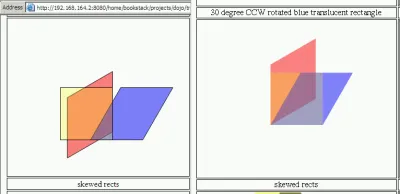
dojoDue to the difference of SVG and VML, the behaviors of Dojo 2D are not the same in all the test cases. I would demonstrate the inconsistencies here.
The left is the Internet Explorer Version 6.0.2900.2180.xpsp_sp2_gdr.050301-1519 in VMWare player, the right side is Mozilla Firefox 1.5.0.5 in Gentoo. This is the default testbed except where otherwise noted.
The test case snippet is:
addTest("skew_rect", function (testName) {
  surface = getTestSurface(testName, "skewed rects");
  // anonymous red rectangle
  surface
    .createRect()
    .setRect(rect)
    .setFill(new dojo.graphics.color.Color([255, 0, 0, 0.5]))
    // skew it around LB point -30d, rotate it around LB point 30d, and move it to (100, 100)
    .setTransform(
      dojo.gfx.multiply(
        dojo.gfx.translate(100, 100),
        dojo.gfx.rotategAt(30, 0, 100),
        dojo.gfx.skewXgAt(-30, 0, 100),
      ),
    );
  // anonymous blue rectangle
  surface
    .createRect()
    .setRect(rect)
    .setFill(new dojo.graphics.color.Color([0, 0, 255, 0.5]))
    // skew it around LB point -30d, and move it to (100, 100)
    .setTransform(
      dojo.gfx.multiply(
        dojo.gfx.translate(100, 100),
        dojo.gfx.skewXgAt(-30, 0, 100),
      ),
    );
  // anonymous yellow rectangle
  surface
    .createRect()
    .setRect(rect)
    .setFill(new dojo.graphics.color.Color([255, 255, 0, 0.25]))
    // move it to (100, 100)
    .setTransform(dojo.gfx.translate(100, 100));
});
The following screenshots demonstrates the different behaviors of VML and SVG, I think the difference results from the rotation centers.
UPDATE: Fixed by Eugene already. :-)